博文

目前显示的是标签为“Linux”的博文

SSH可以做任何事情!

赞美SSH!不需要SAMBA,不需要frp,不需要远程桌面——你需要的,只是SSH! 通过SSH拷贝文件 可以使用scp命令。 scp hostname:/path/to/your_file /path/to/local/dir 这样远程机器上的文件会被下载到本地。 scp  /path/to/local_file hostname:/path/to/remote/dir 这样本地机器上的文件会被上传到远程。如果要拷贝目录,加上 -r 参数即可。 用SSH挂载远程文件夹 安装 sshfs。如果你使用的是 Ubuntu/Debian: sudo apt install sshfs 或者,如果你使用的是 CentOS/RHEL: sudo yum install fuse-sshfs 或者,在 macOS 中: brew install sshfs 创建一个空目录 mkdir /home/user/testdir “链接”或“挂载”两个目录 sshfs user@server.com:/remote/dir /home/user/testdir “取消链接”目录 fusermount -u /home/user/testdir 在 BSD 和 macOS 上,要卸载文件系统: umount mountpoint 或者 diskutil unmount mountpoint 来源 给远程机器使用本地代理 ssh -R 127.0.0.1:8080:127.0.0.1:1234 hostname 其中本地代理运行在1234端口,远程机器可以认为代理运行在8080端口上 ssh -R 127.0.0.1:1234:127.0.0.1:1234 hostnama 这样则是远程和本机使用同样的端口 通过SSH运行Linux GUI app 原理是在本地运行一个Xserver。请参考下面2篇教程: https://www.tomshardware.com/how-to/forward-x-session-ssh https://www.cyberciti.biz/faq/apple-osx-mountain-lion-mavericks-install-xquartz-server/
Linux Tips For Beginners

Linux Tips that you regret not knowing earlier... Configure Linux password-less login Add your public key to ~/.ssh/authorized_keys . To get a public key, simply execute the ssh-keygen command, then you'll find your public key and private key in ~/.ssh The public key is used to encrypt your data, and only the corresponding private key can decrypt that data. Save printed text There're two ways to accomplish this. Use the tee command The tee command redirects stdout to a given file as well as print those text to the screen. usage: ls | tee <path/to/output/file> The | symbol is used to redirect the output of the command before it to the command after it. Use the > or >> symbol to redirect output usage: ls > out.txt > overwrites existing file, while >> append new content to existing file. Refresh command every 1 second Let's say you want to refresh the nvidia-smi command every second, you can simply type watch -n 1 nvidia-smi You can also cha...

如何部署hexo到服务器

图片
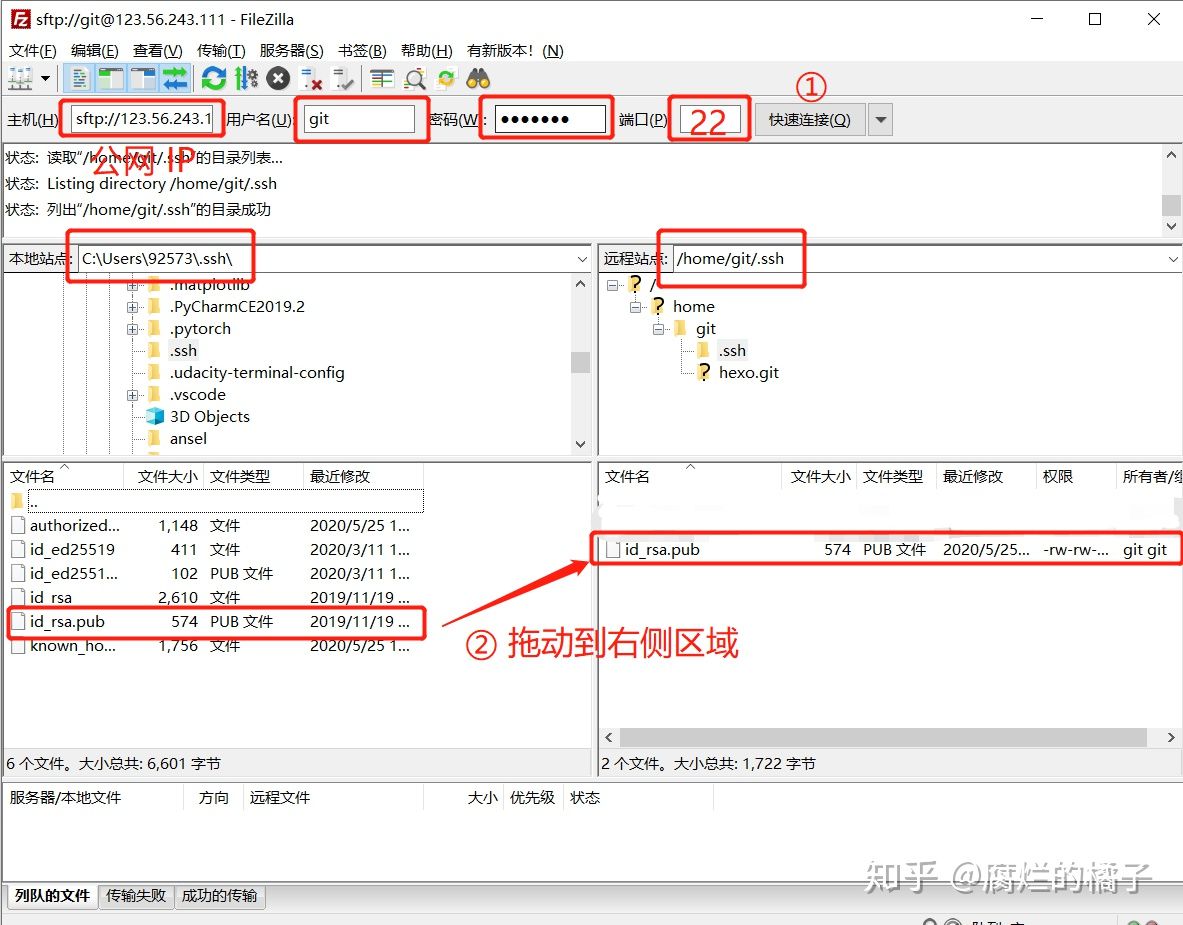
为了部署hexo折腾了两天,期间不知道碰了多少次壁,遇到了许多诡异的问题,比如连接FTP前要先打开允许密码登陆等。这些问题网络上的hexo基本没有提到。网上的教程大多是使用github pages来搭建博客网站的,但是那样的话速度就比较慢,而且现在github.io由于GFW的缘故访问很不稳定,所以接下来我会介绍如何使用自己的服务器搭建hexo博客网站,并给出避坑指南。希望能对大家有帮助ヾ(≧▽≦*)o 配置服务端 安装、配置Nginx 我使用的服务器托管在甲骨文云( 免费服务器 真香~),系统是Ubuntu 20.04LTS,我的本地系统是Windows 11 x64。 系统预装了git和gcc,我们直接apt安装[^nginx]即可。apt安装的软件的配置文件都在 /etc/AppName下。 sudo apt install nginx 现在Ubuntu系统的防火墙会阻止我们访问网站,因此,你需要放行iptables端口: sudo apt update sudo apt install iptables sudo iptables -I INPUT -p tcp --dport 80 -j ACCEPT sudo iptables -I INPUT -p tcp --dport 443 -j ACCEPT sudo iptables -save 这样设置的 iptables 会在重启之后失效,为了让 iptables 规则持久生效,安装 iptables-persistent 。 sudo apt install iptables-persistent sudo netfilter-persistent save sudo netfilter-persistent reload 现在,直接访问服务器的IP,就可以看到Nginx的欢迎界面了! 我们需要一个存着所有网页文件网站目录。我们先新建一个目录。如果你已经有网页文件,放到里面即可。 mkdir -p /home/www/hexo 然后配置Nginx。Nginx可以在一台服务器上用同一个IP托管多个网站,其中 /etc/nginx/sites-available 中存储所有可用的网站配置文件,每一个配置文件对应一个网站。在 /etc/nginx/sites-enabled 中使用软链接指向 sites-av...